Meet retina ready PDF Converter for iPad from @Readdle and win 5 promo codes
8 May, 2012
Finally, PDF Converter looks super sharp on the New iPad. The update brings retina resolution and minor improvements. It is absolutely free for all existing users.
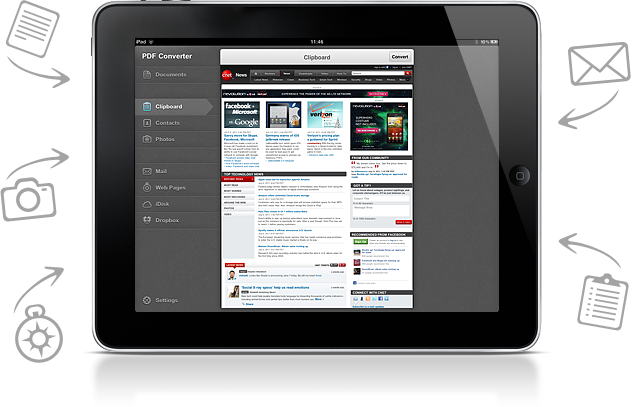
iPad has become an indispensable productivity tool for millions of people. Have you ever thought that you can convert any files into PDFs right on your iPad? PDF Converter will do that for you. You can get a good-looking PDF file from Doc, Excel, Word, JPG, PNG, web-page, etc. There are many hard-to-use web services, that will do the conversion. However, PDF Converter ensures security since your files will never leave the iPad – yes, you don’t need Internet connection for that.
We are fans of simplicity and great design. PDF Converter comes as an ultimately balanced sharp application, focusing on one simple task – converting everything into PDFs. Numerous reviews and mention by TheNextWeb, Wired, TUAW, CultOfMac and other credible sources have pointed out PDF Converters indispensability. For example, if you want to convert a web-page into a PDF file, simple add “pdf” in an address bar and the PDF Converter will automatically open and convert the page. It is very convenient for tickets and receipts.
There are dozens of other uses. We would like to hear from you how will you use PDF Converter for iPad.
Giveaway.
We are happy to share 5 promo codes with you guys. All you need to do is to share this blog post via Twitter or Facebook. And don’t forget to follow and like us.
The winners will be announced in 24 hours.
Let us know your thoughts in the comments below.
Comments
Follow @Readdle
Recent entries
- Scanner Pro 4.5 adds real-time border detection (5 Promos Giveaway)
- Readdle is giving away 5 promo codes for the latest PDF Expert for iPad
- How to get files from ReaddleDocs into Documents?
- Documents for iPhone is LIVE!
- [Infographic] How big is the AppStore? (*2)
- Readdle's new free Calendars app joins the race
- Readdle at Macworld iWorld 2013
- Macworld Expo with @Readdle (free passes for #iFan13 show)
- Documents by Readdle
- Calendars and Google sync issues


Shared on Twitter: https://twitter.com/#!/Jihes/status/199888171205541888
Nice product. Thanks in advance
Tweeted as @iPawn4 https://twitter.com/iPawn4/status/199889387885043712
Liked and Shared as Marc Edward Dalmacio
Google+1 as Marc Edward Dalmacio
5 copies of PDF Converter go to @extremelygamer @iambobwood @GrishaKrasutski @fabr1z @gamps1
Congrats to the winners and thanks everyone for the participation!
That would help me to convert the scripts right with my iPad.
Some lazy teachers don’t convert it in PDF..
This way I can’t use the script with PDFexpert -.-
With this tool, I could even do the converting on my iPad
Would be great to win this.
Twitter Name: w_Joscha
RT @jackson5th
Shared on FB as Bone Jason
Thanks for the giveaway, hope to win
PDF Converter would be another great implementation for my University workflow!
Tweeted about the giveaway as @florianlionel
Shared on twitter
https://twitter.com/#!/ha014/status/199898543115354112
Thanks for this contest.
Tweeted as @extremelygamer
Liked and shared as Eason Kinsler
Looks like a very fresh and powerful PDF file convertor for iPad. Would very to win a copy if possible.
Thanks for the giveaway!
This would be great for all types of schoolwork…endless possibilities.. Thank you for the chance. Tweeted, liked, and followed. (Tea6767)
Would be good to use on the iPad – especially keeping track of my blood glucose numbers and being able to give a professional document to my doctors. They’ll be blown away + you guys make exception products anyways and it would be nice to win
Good concept … shared on Facebook
I love Readdle and all its products. As a law student, I used PDF Expert all the time to read and markup judicial opinions and class outlines. PDF Converter would be the perfect addition to my workflow.
Readdle rocks!
https://twitter.com/#!/SStrky/status/199910714100551680
(Shared on Facebook as well: https://www.facebook.com/SamuelStarkey/posts/405567386143387)
Again,,the opportunity comes.
Convert everything into PDF and then open it via PDF Expert. Wonderful!
PDF Converter would pair nicely with PDF Expert. I’m pleasantly surprised by how much is possible now on an iPad with the right apps; I’m actually able to shift some work off the desktop and laptop onto the iPad when I’m on the go. PDF Converter would be a real plus in my editing/review workflow.
tweeted @lgxlg
Good app for my work !
RT@pussycatzhuang
Tweeted @j4u
tweeted: https://twitter.com/#!/h7255/status/200040545349935104
facebook: Domenico Vitello
https://www.facebook.com/domenico.vitello/posts/228746033905353
Tweeted as CAZTILLO
This is app can be very useful to convert my organic chem notes to PDF. Thank you for the chance to win this promising app.
Wow! great iPad app! Tweeted as @springlong on twitter! Liked as Liao Casse on Facebook! Thank you very much!
RT as oskrgab
Shared and liked as Oscar Cortez
Tweeted @ultimate7sch
Liked and shared as Sun CH.
Thanks for the awesome giveaway!
Awesome!!
Twitter: @luisafromitaly
Liked on FB as Julia Dai
It is really helpful when I try to find some references on the web with my New iPad. And I use my New iPad to do a lot of reading and research, it is much more convenient than the computer, I think. Meantime, I also expect more with the app.
By the way, I’ve already had good experience with your PDF Expert. But you guys know, the users always want more… keep updating and make your handwriting experience better please…:)
Done and Like the app
This App doesnt convert the excel sheets into PDF. When contacted, i was told to get connected to my desktop and route the excel sheet through itunes. If thats the case then i have Acrobat convertor on my desktop so why do i need this. You have said that all conversions into PDF takes place locally on the iPad. So can u fix it up and update pl.
It does a marvelous job on the text document and others like contacts, photos etc. pl resolve the issue of converting the excel files to pdf soon. Otherwise its a pretty good App to have on ur iPad