There’s a particular kind of tiredness that doesn’t come from working too much, but from working on too many different things at once.
Switching between tasks isn’t free for your brain. Cognitive psychology research shows that every time you change tasks, your brain has to pause what it was doing, then restart it later. This process takes mental energy and can make you slower and more error-prone.
If your workday feels fragmented by jumping from emails to meetings to “quick tasks” that somehow eat the whole afternoon, you’re not alone. Modern work constantly pulls our attention in a dozen directions.
Task batching offers a way to take some of that control back by designing your day around focus, not interruptions. This results in less mental fatigue, fewer unfinished tasks, and a workday that feels more intentional, even when distractions are unavoidable.
So why does task batching make such a noticeable difference? And how can it help counteract short attention spans in modern work? Let’s take a closer look.
What Task Batching Is (and What It Isn’t)
Task batching is straightforward in principle: it’s about grouping similar tasks together and completing them in dedicated sessions, rather than scattering them across the day. Writing all your emails in one sitting, reviewing several documents at once, or scheduling multiple meetings in a single block are simple examples.
The real power of task batching comes from how it reduces mental resets. Each time you switch between unrelated tasks, your brain has to pause, reorient, and restart, which consumes energy and slows you down. By keeping similar work together, you stay “in the same mode” for longer stretches, making work feel smoother and more manageable.
Task batching is often confused with other productivity strategies. Some people compare it to habit stacking, which is about linking new behaviors to existing routines. While habit stacking builds consistency, task batching is about organizing work to protect focus, not forming habits.
It’s also sometimes mistaken for multitasking. Multitasking involves juggling different types of work at the same time, which can decrease efficiency and accuracy. Task batching takes the opposite approach: it consolidates similar tasks into a single flow, so your attention stays focused on one type of work before moving on.
Real-World Examples for Task Batching
Task batching can be adapted to any type of work or routine, whether you’re in a traditional office, running your own business, or managing a household. Here’s how it might look for different people.
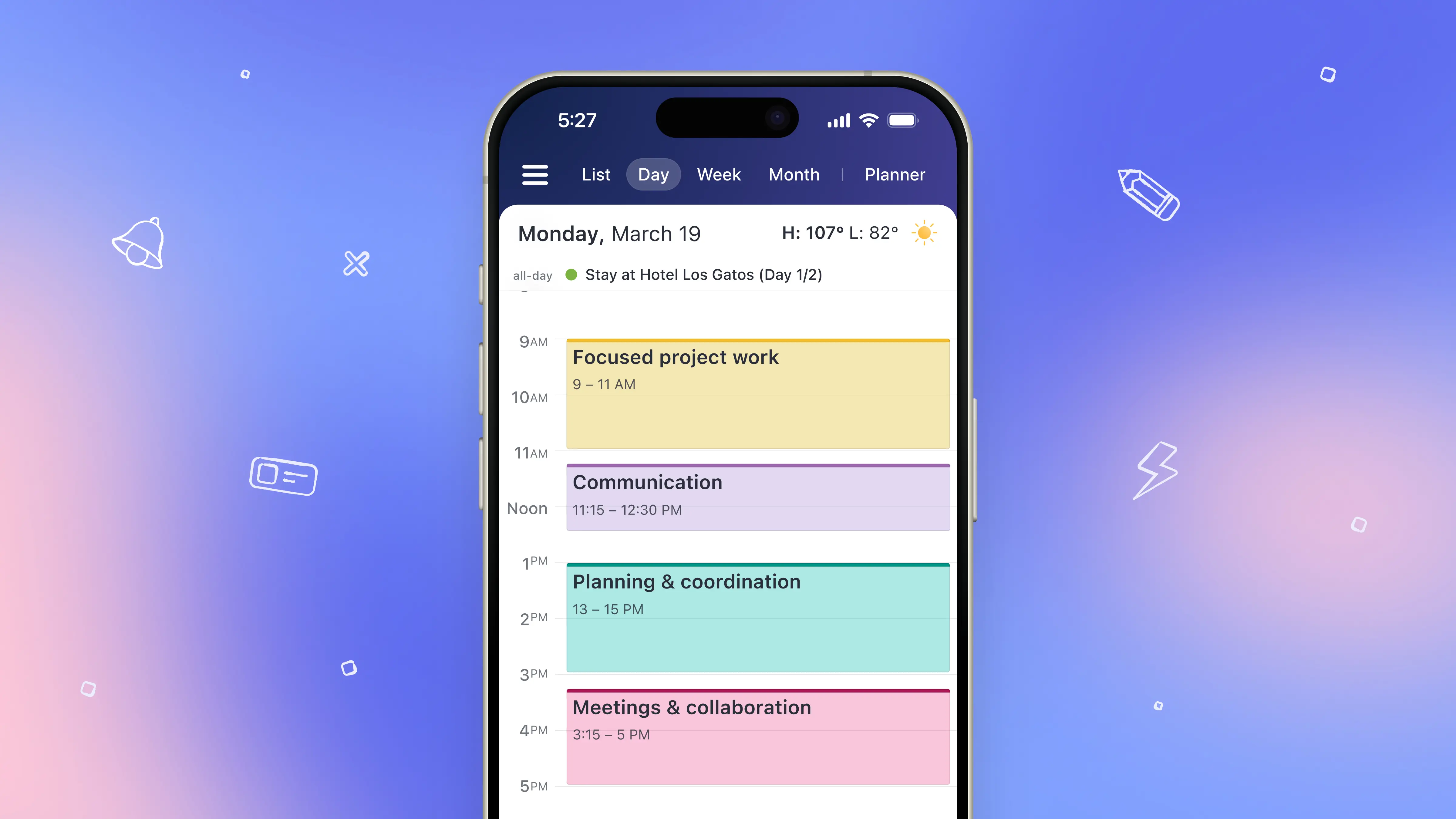
1. The 9-to-5 Office Worker
Imagine a project coordinator who has to respond to emails, prepare reports, attend team meetings, review project deliverables, and schedule upcoming tasks.
They can batch tasks like this:
Morning (9:00 AM – 11:00 AM): Focused project work
Review project deliverables, update reports, and draft key documents.
Late morning (11:15 AM – 12:00 PM): Communication
Respond to emails, Slack messages, and phone calls in one block.
Afternoon (1:00 PM – 3:00 PM): Planning & coordination
Schedule tasks, organize calendars, and prepare for upcoming meetings.
Late afternoon (3:15 PM – 5:00 PM): Meetings & collaboration
Attend team calls, provide updates, and discuss next steps.
2. The Freelancer or Business Owner
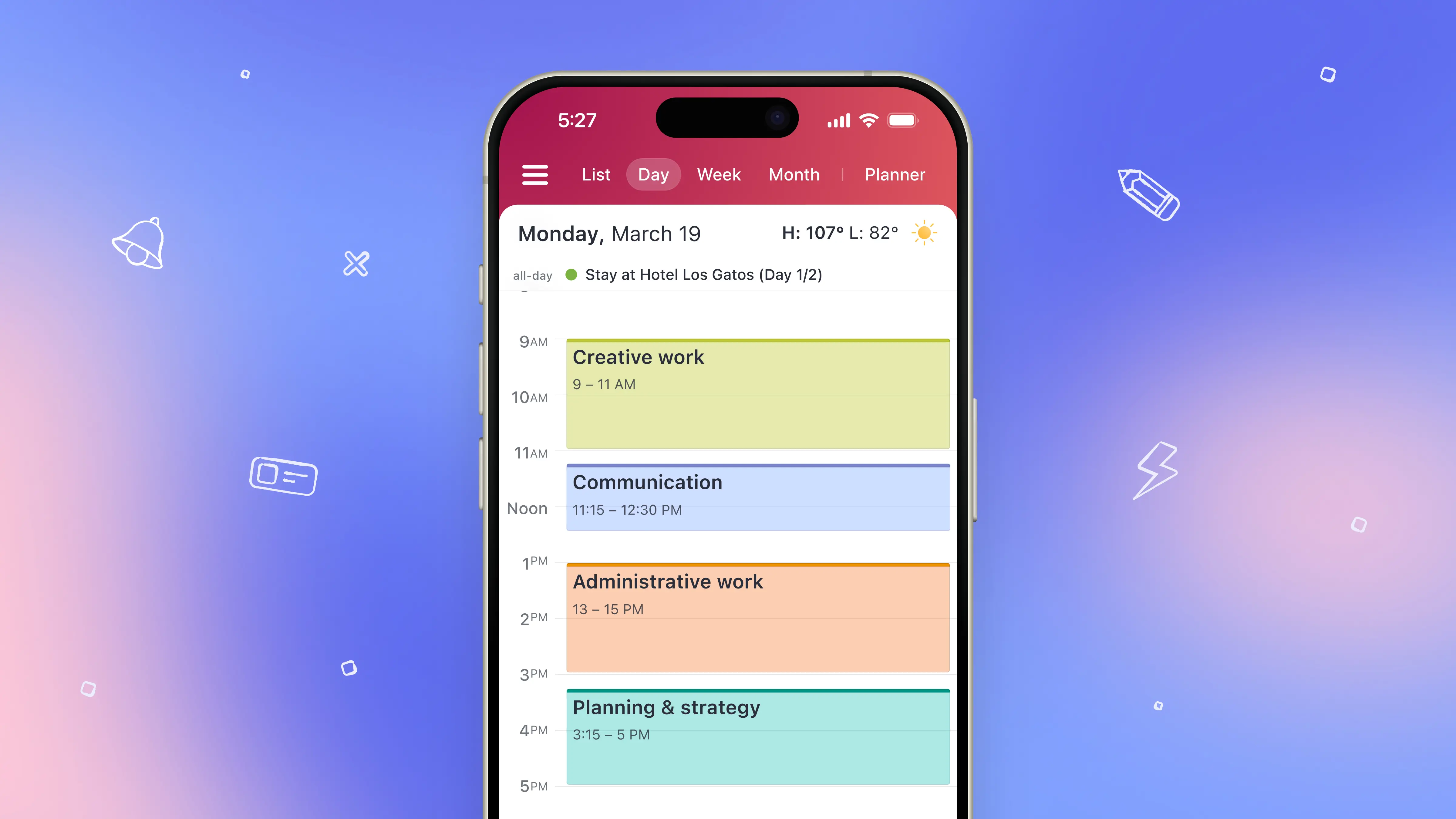
Consider a freelance designer juggling client work, content creation, and invoicing. Their day could easily scatter between designing assets for clients, writing proposals, client calls and emails, administrative tasks like invoicing, or planning social media content.
Task batching might look like this:
Morning (9:00 AM – 11:00 AM): Creative work
Design client assets and create visuals for social media campaigns.
Late morning (11:15 AM – 12:00 PM): Communication
Respond to client emails and schedule calls for the week.
Afternoon (1:00 PM – 2:30 PM): Administrative work
Prepare invoices, update accounting records, and organize files.
Late afternoon (2:45 PM – 4:00 PM): Planning & strategy
Draft proposals, outline project roadmaps, and plan upcoming content.
3. The Home Manager
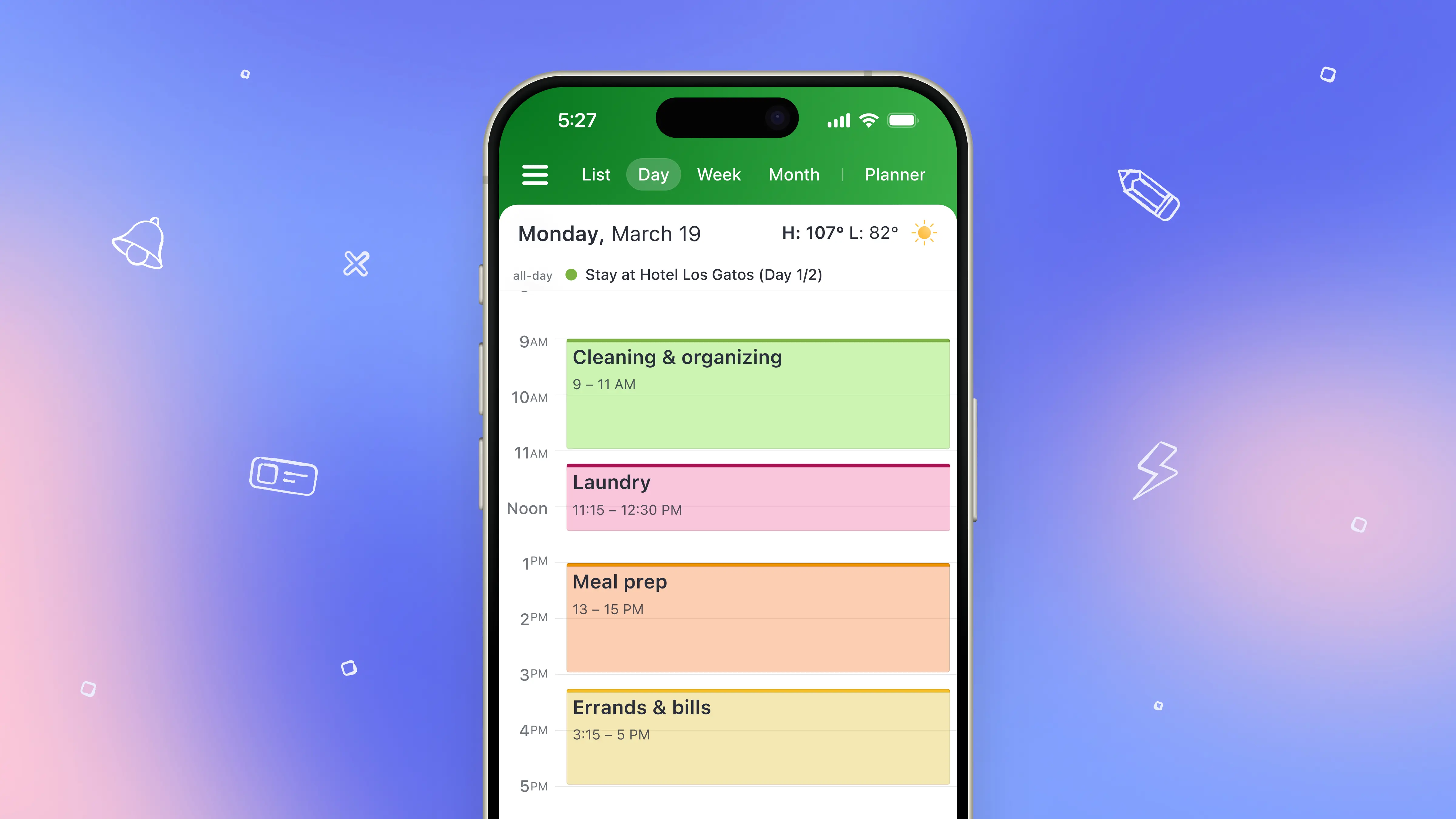
Even managing household tasks can benefit from batching. Imagine someone handling laundry, meal prep, cleaning, paying bills, and running errands.
Instead of switching constantly, they could structure the day like this:
Morning (8:00 AM – 9:30 AM): Cleaning & organizing
Tidy rooms, sweep floors, and organize living spaces.
Midday (10:00 AM – 11:30 AM): Laundry
Wash, dry, and fold all laundry in one session.
Late morning (11:45 AM – 12:30 PM): Meal prep
Prepare ingredients and cook for the week ahead.
Afternoon (1:00 PM – 2:00 PM): Errands & bills
Pay bills, shop for groceries, and handle small errands.
How to Task Batch in 4 Simple Steps
Task batching works best when you plan deliberately and protect dedicated blocks of focus. Here’s a step-by-step approach to creating a workflow that lets you do more with less mental friction and how you can do it in the Calendars app.
1. Start with a Weekly To-Do List
Before you can batch effectively, you need to know what work you actually have. Open Calendars and create a new task for all the things you want to tackle that week. On the iPhone, you can do this quickly by tapping the ⚡ lightning icon in the bottom menu, swipe left into the inbox, and begin creating a to-do list of all your tasks.
2. Group Similar Tasks Together
The essence of batching is logical grouping. Instead of scattering tasks randomly, organize them by type: emails, meetings, creative work, administrative tasks, or even personal errands. In Calendars, you can use Lists in the Planner feature and create color-coded lists like Work, Study, or Shopping to make it easy to find tasks later. Once you’re done, go back to Inbox where you can move tasks between lists to put them under the right label.
3. Block Off Time Using Events
Instead of scheduling every task separately, block off time by creating events that match your task batches. These events act as containers for focused work.
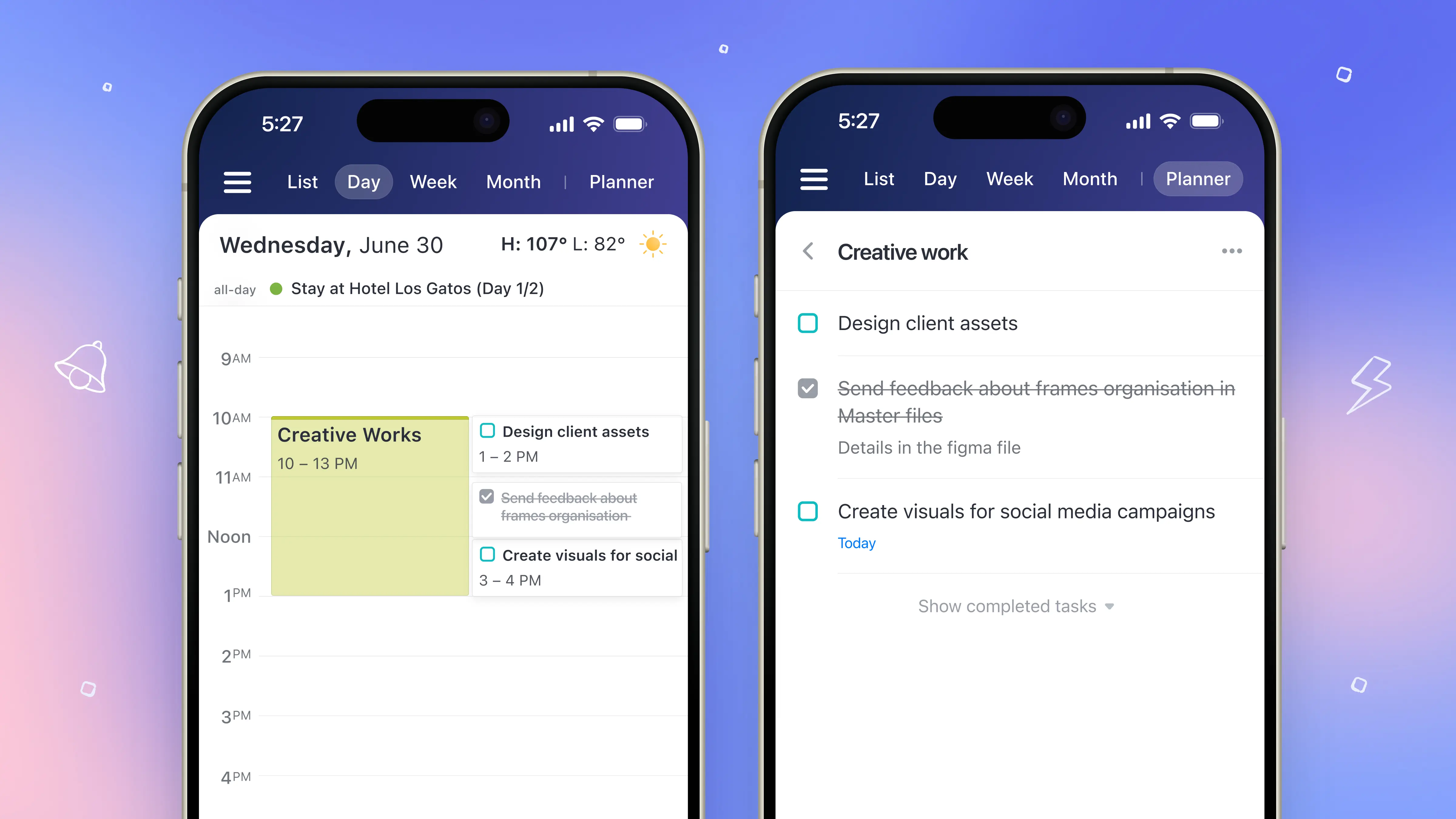
In Calendars, create an event and title it after the batch itself, such as “Email & Admin,” “Deep Work,” “Shopping,” or “Client Work.” Assign the event the same color as the corresponding task list in Planner. This visual alignment makes it instantly clear what kind of work you’re doing at a glance, no extra thinking required.
For example, if your “Shopping” list is green, create a green “Shopping” event and drop it into your calendar for a specific time window. During that block, you simply work through the tasks already sitting in that list.
This approach keeps your calendar uncluttered while still protecting focused time. Your tasks live in lists; your calendar holds time boundaries. When it’s time to work, you open the matching list and execute.
4. Maintain Focus and Track Progress
With your batches scheduled, treat each block as a protected focus session. Mark tasks as done directly in the timeline as you complete them. Over time, you’ll notice that your brain has fewer resets, productivity feels smoother, and mental fatigue decreases, all without adding extra hours to your day.
Ready to put task batching into practice?
Download Calendars and start organizing your tasks into clear, distraction-free time blocks — all from one app.