You're standing in front of a piece of furniture, a doorway, or a package you need to ship, and your tape measure is nowhere. Your phone is, however, already in your hand. Here’s where an app like Scanner Pro can be a real saver.
Scanner Pro's Measure mode lets you capture precise distances and areas directly on camera, without any additional hardware or apps.
The Measure Tool brings something that professionals and DIYers have long needed into the same app you can already use for scanning documents and receipts.
What you can measure:
- Linear distances along any object's edge
- Total area of flat surfaces like blueprints, floor plans, or product packaging
- Multiple segments in a single session, with the ability to undo and redo
This is especially useful for architects reviewing field dimensions, contractors checking measurements against plans, real estate agents documenting room sizes, and anyone who needs a quick, documented measurement they can share.
How to Access Measure Mode
There are two entry points in Scanner Pro:
- From the scan creation screen
- Tap the orange Camera button at the bottom of the main screen.
- On the mode selector above the Shutter button, swipe to find and tap Measure.
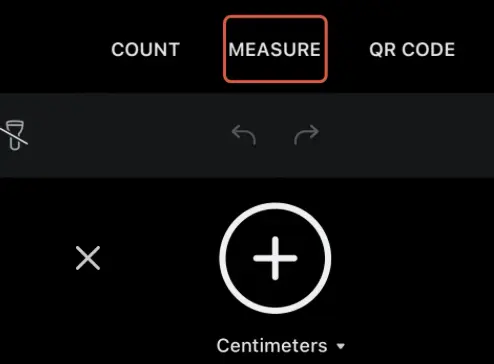
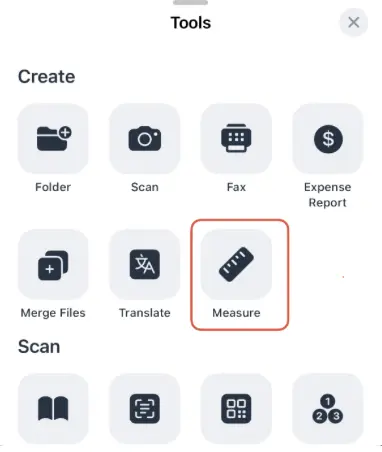
- From the Tools tab:
- Tap Tools at the bottom of the screen.
- Select Measure from the list of available tools.
How to Measure an Object
- Move your phone closer to the object until it fits within the camera frame. The camera view needs to see the full edge or surface you want to measure: if the object extends outside the frame, your reading won't be accurate.
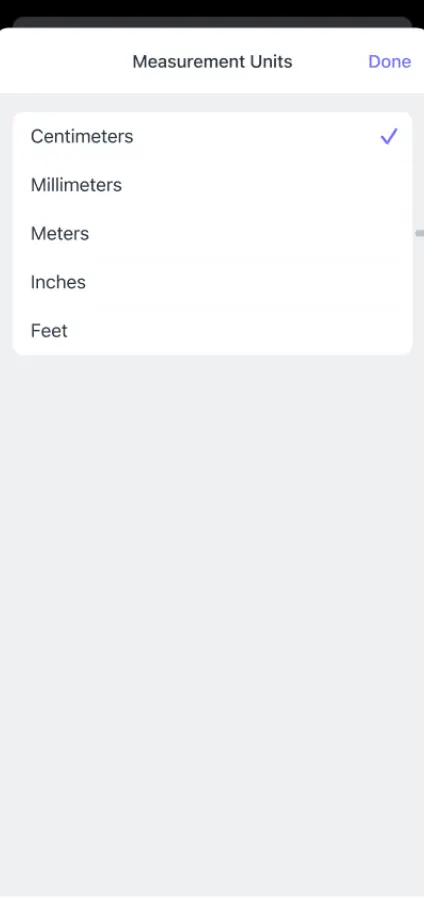
- Before you start, tap the measurement settings under the Plus icon. Under Inches & Feet, you can choose between decimal and fractional formats and adjust the level of precision. Metric units (centimeters and meters) are also available if you prefer.
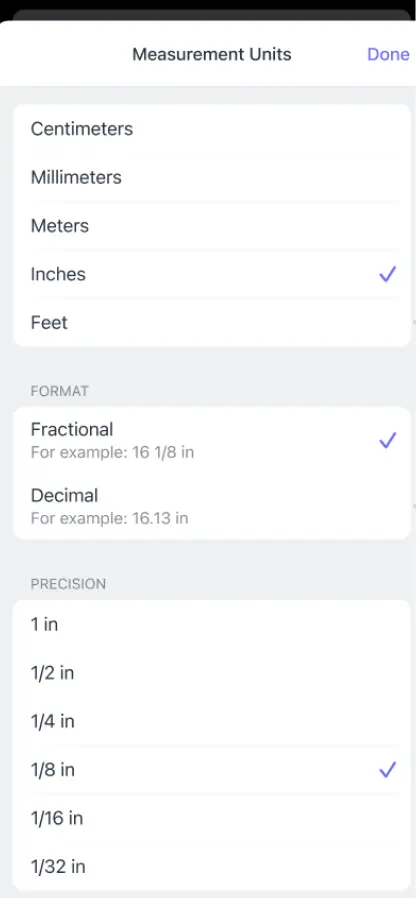
- Tap the Plus icon to begin selecting an edge. Scanner Pro saves each angle as you go. Continue tapping to trace the full outline of the object, edge by edge.
- If you make a mistake, tap the Undo and Redo arrows at the bottom of the screen to back up and try again. You don't need to start over - just get back to your last good point.
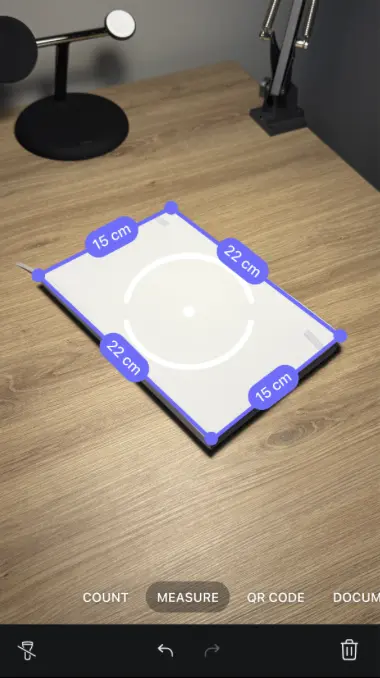
- Once you've covered the entire object, tap Next. Scanner Pro captures an image of the object with the total length and area overlaid on the scan. This becomes a document in your Scanner Pro library.
Real Use Cases
Contractors and builders: Shoot dimensions on site directly into a document. No handwritten notes, no transcription errors. Export the image with measurements annotated directly on it and share it with your team or client before you leave the job site.
Interior designers and renovators: Measure a room, a wall section, or a piece of furniture in seconds. Pair with Scanner Pro's PDF tools to annotate floor plans or attach measurements to a project file.
Shipping: Quickly get package dimensions to calculate shipping costs. The area function is useful for anything you're quoting by square footage: carpet, tile, paint coverage.
Real estate professionals: Document room dimensions during walkthroughs. The captured image with measurements gives buyers something concrete to work from, and it takes seconds to generate.
Students and researchers: Measure physical artifacts, specimens, or items in the field. The annotated image doubles as documentation you can drop into a report.
Tips for Accurate Measurements
- Keep the camera steady. Scanner Pro reads distances based on what the camera sees: any movement between taps could potentially lead to error. Brace your arm against something if you're measuring over a long distance.
- Work in good light. The feature relies on edge detection. Low-contrast scenes (white objects on white surfaces, for example) make it harder for the camera to lock onto edges precisely.
- Get the full edge in frame. If an object is too large to fit entirely in the camera view at a reasonable distance, measure it in segments.
- Use the undo button when necessary. If a tap didn't land quite right, undo and redo it. It's faster than redoing the whole measurement.
FAQ
What devices support Measure Mode?
Measure works on iPhone and iPad running iOS 17 or iPadOS 17 or later.
How accurate is Scanner Pro's Measure feature?
It's specifically designed for practical measurement tasks like checking dimensions, reviewing blueprints, and estimating areas. For applications requiring certified precision (engineering sign-offs, legal property measurements), a physical tool or laser device remains the standard.
Can I export the measurement as a document?
Yes. After completing a measurement and tapping Next, Scanner Pro captures the annotated image with your measurements overlaid. This image is saved to your Scanner Pro library and can be exported as a PDF or JPEG, shared via AirDrop, emailed, or uploaded to any connected cloud service.
What units does Scanner Pro support?
Inches and feet (with decimal or fractional precision options) and metric units (centimeters and meters). You can switch units before starting a measurement in the Measure view.
Can I undo a measurement mid-session?
Yes. Tap the Undo and Redo arrows at the bottom of the Measure screen to remove the last point. You can undo multiple steps back to the beginning of your session if needed.
Is an Internet connection required?
No. Measure Mode works locally on your device. You don't need Wi-Fi or cellular to use it, though you'll need connectivity to upload results to cloud storage if you choose to do so.

Take high-quality scans
Easily turn papers into PDFs with your iPhone and iPad. Scan receipts, books, IDs, invoices.